
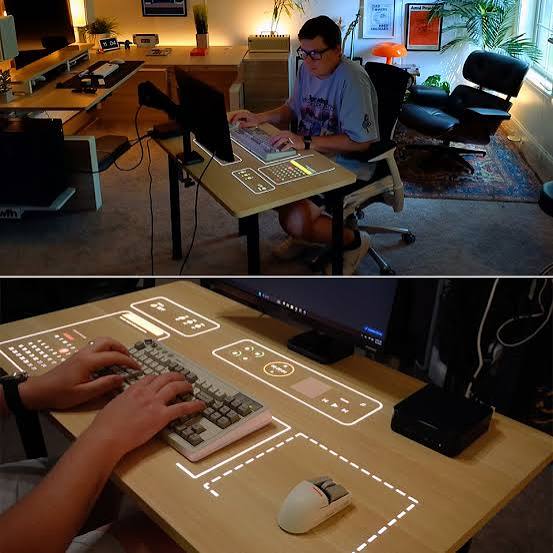
A workspace should do more than provide a surface for a computer and office supplies. It should reflect your personality, support your daily routine, and create an environment where you can concentrate comfortably. One of the easiest ways to introduce both function and character is by building your setup around a smart desk display. This type of digital accessory can become a visual centerpiece while also providing useful information throughout the day.
Whether you work from home, study, create digital content, or simply enjoy technology, there are many ways to make your desk feel more personal. From choosing a visual theme to organizing accessories around the display, thoughtful customization can transform an ordinary workstation into an engaging and efficient space.
Choose a Visual Theme That Matches Your Personality
The first step in personalizing your workspace is deciding what atmosphere you want to create. A smart desk display can complement almost any design direction because digital visuals can be changed according to your mood and preferences.
For a minimalist desk, consider simple pixel designs, subtle animations, clocks, or clean information layouts. If you prefer a playful environment, colorful graphics, animated characters, and retro-inspired visuals can add personality. Creative professionals may enjoy displaying artwork, custom patterns, or visual elements connected to their hobbies.
The important thing is consistency. Choose desk accessories, lighting, and colors that work with the display instead of competing with it. A coordinated visual theme makes the entire workspace feel intentional.
Make the Display the Focal Point
A smart desk display can serve as the visual centerpiece of your workstation. Instead of placing it randomly among cables, stationery, and other equipment, give it a dedicated position where it is easy to see.
You might place it beside your monitor, underneath a wall shelf, or near the corner of your desk. The ideal location depends on how you intend to use it. If you frequently check the time or other information, position it within your natural line of sight.
Leaving some open space around the display can also make it stand out. A clean area prevents the desk from appearing crowded and allows the digital visuals to become part of the overall décor.
Personalize the Content You See
One of the biggest advantages of a smart desk display is the ability to customize what appears on the screen. Instead of treating it as a static clock or decorative object, use it to display information and visuals that matter to you.
For example, you can choose designs related to your favorite games, artistic interests, music, technology, or hobbies. Some users may prefer practical information, while others may want their display to function primarily as digital artwork.
Changing the displayed content occasionally can also keep your workspace feeling fresh. A different visual during the weekend can create a more relaxed atmosphere, while a simple productivity-focused screen may be better during working hours.
Build a Matching Lighting Setup
Lighting has a major influence on how a workspace feels. A smart desk display can become even more attractive when combined with lighting that complements its visual style.
Consider adding a desk lamp with adjustable brightness or subtle ambient lighting behind the monitor. If your display features colorful digital artwork, surrounding lighting can help reinforce the same atmosphere. For a calmer workspace, softer illumination may be more appropriate.
Avoid excessive lighting, however. Too many bright sources can create visual distractions and make it difficult to focus. The goal should be balance rather than maximum brightness.
Add Small Decorative Elements
Personalization does not require filling every available space. A few carefully selected accessories can make a major difference.
A small plant can introduce a natural element next to the technology. A favorite figurine, miniature sculpture, notebook, or framed photograph can also make the workspace feel more personal. If you enjoy retro technology, consider adding vintage-inspired accessories that complement the digital aesthetic of your smart desk display.
The key is to select objects that have meaning or purpose. A personalized workspace should feel like your environment rather than a collection of random decorations.
Create a Productive Information Station
Your smart desk display can also become part of a productivity system. Instead of relying entirely on your computer screen, use the dedicated display for quick-glance information.
Depending on the capabilities of the device, useful information might include the current time, reminders, weather details, schedules, or other visual notifications. Having this information available without opening another application can reduce small interruptions during the day.
You can organize the surrounding desk accordingly. Keep frequently used stationery nearby, place your phone in an accessible location, and position the display where important information can be viewed quickly.
Match Your Desk Accessories
A cohesive workspace often comes down to small details. If your smart desk display has a modern appearance, minimalist accessories can help maintain a clean aesthetic. If it has a colorful or retro design, playful accessories can create a stronger theme.
Consider matching items such as your mouse pad, keyboard, desk mat, headphone stand, storage containers, and cable organizers. They do not need to be identical, but complementary shapes, materials, or colors can make the workspace look more unified.
Even simple improvements, such as replacing tangled cables with organized cable channels, can make the display appear more prominent and polished.
Use Different Themes for Different Activities
Your workspace does not have to maintain exactly the same appearance throughout the day. One smart approach is to create different visual themes for different activities.
A focused work theme could feature a simple clock or restrained design. A creative session might use colorful artwork or animations. During gaming or entertainment time, a more energetic visual style could make the environment feel immersive.
Seasonal themes can also add variety. Changing the display for holidays, special occasions, or different seasons provides an easy way to refresh the desk without buying new furniture or decorations.
Keep Ergonomics in Mind
Personalization should never come at the expense of comfort. A beautiful workspace is less useful if the arrangement causes neck strain, clutter, or awkward movements.
Place the smart desk display at a comfortable viewing angle and make sure it does not obstruct your monitor or essential equipment. Keep frequently accessed objects within easy reach and leave sufficient room for your keyboard and mouse.
Good cable management is equally important. Cables should be routed away from areas where your hands and arms move frequently. A clean desk not only looks better but can also make everyday work more comfortable.
Refresh the Workspace Regularly
A personalized workspace does not have to remain unchanged. In fact, small changes can keep it inspiring over time.
Try changing the smart desk display’s artwork, moving a few decorative objects, introducing a new plant, or adjusting your lighting. You can also reorganize accessories when your work habits change.
Regularly reviewing the setup helps ensure that every item still serves a purpose. If something creates clutter without providing value, removing it may improve the overall environment more than adding another accessory.
Create a Space That Feels Like Yours
The best workspace personalization combines technology, practicality, and individual style. A smart desk display can provide a strong foundation because it can function as both an information tool and a decorative feature.
By selecting a suitable visual theme, positioning the display carefully, coordinating lighting and accessories, and customizing the information shown on the screen, you can create a workstation that feels distinctive. Small details such as plants, artwork, cable organization, and matching desk accessories can further strengthen the design.
Ultimately, personalization is about creating an environment that makes you feel comfortable and motivated. Whether your ideal setup is minimalist, colorful, retro, futuristic, or highly practical, a smart desk display can help bring that vision together while adding useful digital functionality to your everyday workspace.
